I have been working on an ESP32-S3 based RC car with cam streaming (OV5640 camera). I'm limited though to around 5FPS, because when I bump the camera clock from 8MHz to around 20MHz, it hogs all the processing and the WiFi stack becames bursty.
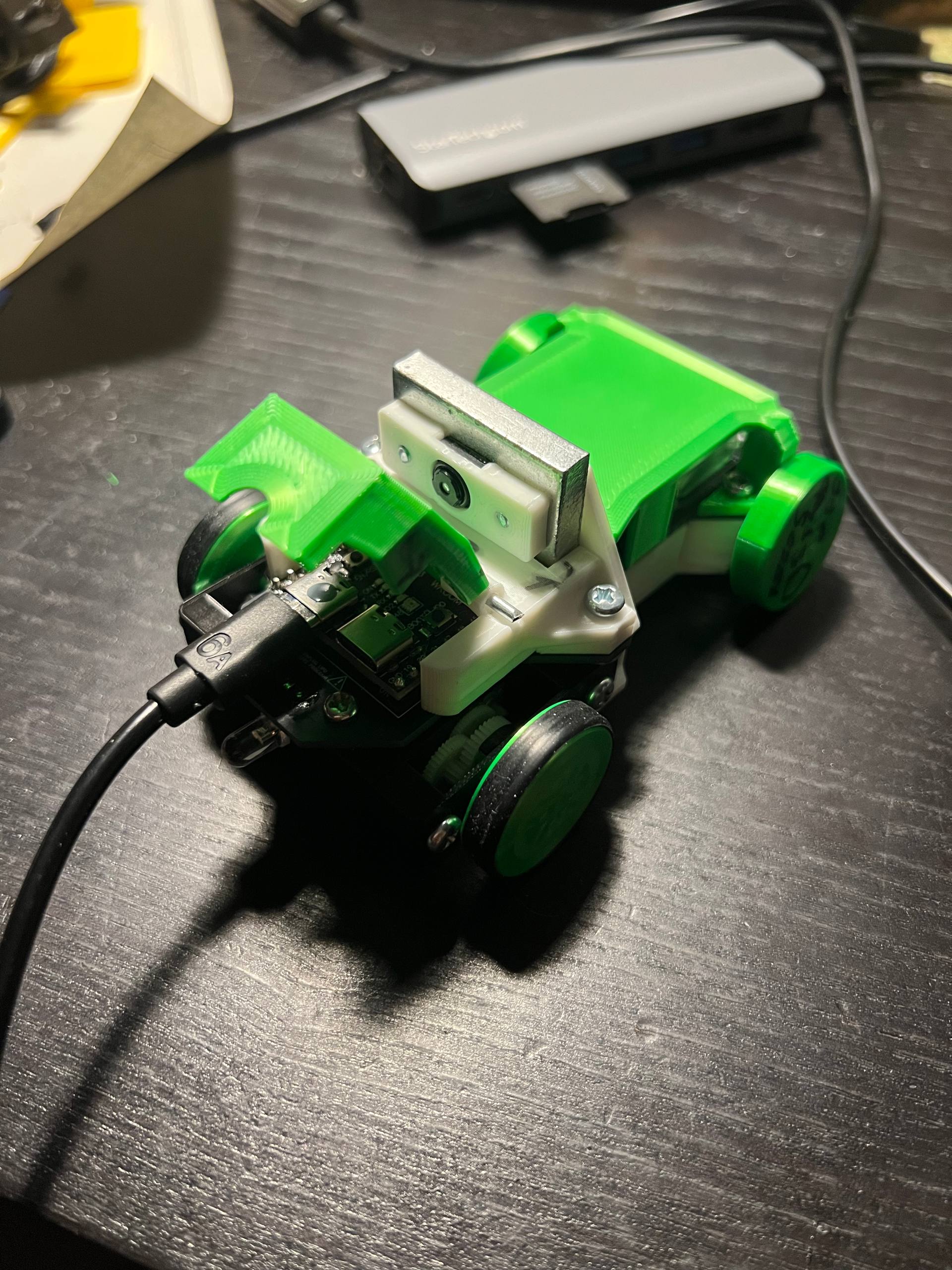
The problem seems to be a camera task created on core 0 by default. Even when not capturing frames, the VSync-triggered DMA is enough to bog down the micro when the camera is clocked too high.
The task is also running at configMAX_PRIORITIES -2, it's nuts, tied with
the WiFi. I guess it makes sense because the window for DMA is really
short, but in any case I wanted to test if moving it to other core or at least
lowering the priority would help me.
In my Arduino framework based project, I'm expecting to see:
| Task | Core | Pri | Notes |
|---|---|---|---|
| ipc1 | 1 | 24 | inter-processor calls, core 1 |
| loopTask | 1 | 1 | runs setup() then loop() |
| IDLE1 | 1 | 0 | core 1 idle |
| ipc0 | 0 | 24 | inter-processor calls, core 0 |
| wifi | 0 | 23 | main wi-fi task |
| cam_task | 0 | 23 | VSync DMA's for the camera, what we are debugging. |
| esp_timer | 0 | 22 | esp_timer dispatch |
| wifi_sta | 0 | 23 | station management (sometimes merged with wifi) |
| tiT | 0 | 18 | TCP/IP (lwIP) task |
| IDLE0 | 0 | 0 | core 0 idle |
The crux of the problem is that the #define CONFIG_CAMERA_CORE1 is fully
ignored because Arduino-based projects come with a precompiled
libesp32-camera.a binary, and they decided to compile it for core 0.
This leaves me with just a few options to change the core and priority:
- I could figure out how to compile that myself and tell the linker to override
the default
.afile. Boring. - I could migrate the project to ESP-IDF. Painful.
- I can hack the hell out of the
.abinary. Fun. Not going to end up well but fun.
We are obviously going with option 3.
As a side note, I explored changing the core at runtime, but the FreeRTOS version that the ESP uses does not support those methods.
Tools
This is not a normal x86, ARM etc architecture, it's Xtensa. So we need their tooling:
AR=~/.platformio/packages/toolchain-xtensa-esp32s3/bin/xtensa-esp32s3-elf-ar
ARCHIVE=~/.platformio/packages/framework-arduinoespressif32/tools/sdk/esp32s3/lib/libesp32-camera.a
OBJDUMP=~/.platformio/packages/toolchain-xtensa-esp32s3/bin/xtensa-esp32s3-elf-objdump
AS=~/.platformio/packages/toolchain-xtensa-esp32s3/bin/xtensa-esp32s3-elf-as
Now that we have their toys, we can peek inside libesp32-camera.a and see what's inside:
LIB=~/.platformio/packages/framework-arduinoespressif32/tools/sdk/esp32s3/lib/libesp32-camera.a
$AR -t $LIB | grep cam
cam_hal.c.obj
esp_camera.c.obj
ll_cam.c.obj
We care about cam_hal.c, that's where the source was. Let's copy it into some tmp folder and we can work there:
# Quick reference for objdump flags:
# -t — symbol table: Lists all symbols (functions, variables) defined or referenced in the object file.
# -d — disassemble: Tells you what the code does.
# -r — relocations: Lists places where addresses need to be interpolated.
$AR -x ./libesp32-camera.a cam_hal.c.obj
$OBJDUMP -r cam_hal.c.obj | grep -i "PinnedToCore"
| 000000c8 | R_XTENSA_32 | xTaskCreatePinnedToCore |
| 346 | R_XTENSA_ASM_EXPAND | xTaskCreatePinnedToCore |
You can read the whole objdump to verify this, but the first result is for
.literal and can be ignored, the 0x346 one is the one for .text (the
actual code) and the one we care about.
$OBJDUMP -d cam_hal.c.obj | grep -C 20 "346:"
...
30f:	ffaa86        	j	1bd <cam_config+0x1bd>
312:	000081        	l32r	a8, fffc0314 <cam_config+0xfffc0314>
315:	0008e0        	callx8	a8
318:	202aa0        	or	a2, a10, a10
31b:	013a16        	beqz	a10, 332 <cam_config+0x332>
31e:	000081        	l32r	a8, fffc0320 <cam_config+0xfffc0320>
321:	0008e0        	callx8	a8
324:	000021        	l32r	a2, fffc0324 <cam_config+0xfffc0324>
327:	0000b1        	l32r	a11, fffc0328 <cam_config+0xfffc0328>
32a:	1129      	s32i.n	a2, a1, 4
32c:	92a122        	movi	a2, 0x192
32f:	ffa286        	j	1bd <cam_config+0x1bd>
332:	05f8      	l32i.n	a15, a5, 0
334:	0add      	mov.n	a13, a10
336:	01a9      	s32i.n	a10, a1, 0
338:	0000c1        	l32r	a12, fffc0338 <cam_config+0xfffc0338>
33b:	0000b1        	l32r	a11, fffc033c <cam_config+0xfffc033c>
33e:	0000a1        	l32r	a10, fffc0340 <cam_config+0xfffc0340>
341:	30cff2        	addi	a15, a15, 48
344:	7e1c      	movi.n	a14, 23
346:	000081        	l32r	a8, fffc0348 <cam_config+0xfffc0348>
349:	0008e0        	callx8	a8
34c:	ff3806        	j	30 <cam_config+0x30>
...
To understand this, we need to first see the prototype of the function that is
pinning the cam_task to core 0 (and setting the priority).
xTaskCreatePinnedToCore(
  cam_task,  // Arg 1: the task
  "cam_task", // Arg 2: debug label
  CAM_TASK_STACK, // Arg 3: stack size
  NULL,
  configMAX_PRIORITIES - 2, // Arg 5: Priority
  &cam_obj->task_handle,
  0  // Arg 7: The core!
);
The ABI forXtensa can get a bit tricky because of windowing, but the gist is
that the first 6 arguments go into a10, a11, ..., a15, and the seventh goes
into the stack (a1, it would be sp[0] in x86 lingo). Return values go to a0.
If you want, you can also RTFM. It helps with the opcodes.
With this information we can demistify the assembly a bit (see comments on the right):
...
30f:  ffaa86      j  1bd
312:  000081      l32r  a8, fffc0314
315:  0008e0      callx8  a8
318:  202aa0      or  a2, a10, a10
31b:  013a16      beqz  a10, 332       # Skips a few lines if a10=0
31e:  000081  J┌─ l32r  a8, fffc0320
321:  0008e0  U│  callx8  a8
324:  000021  M│  l32r  a2, fffc0324
327:  0000b1  P│  l32r  a11, fffc0328
32a:  1129    E│  s32i.n  a2, a1, 4
32c:  92a122  D│  movi  a2, 0x192
32f:  ffa286   └─ j  1bd
332:  05f8        l32i.n  a15, a5, 0
334:  0add        mov.n  a13, a10
336:  01a9        s32i.n  a10, a1, 0   # <- set stack[0] (the core) to a10 (must be a 0)
338:  0000c1      l32r  a12, fffc0338
33b:  0000b1      l32r  a11, fffc033c
33e:  0000a1      l32r  a10, fffc0340
341:  30cff2      addi  a15, a15, 48
344:  7e1c        movi.n  a14, 23      # Move 23 to arg 5 (priority!)
346:  000081      l32r  a8, fffc0348
349:  0008e0      callx8  a8           # actual call to pin the task
34c:  ff3806      j  30
...
- Because of s32i.n running a
a1[0] = a10, we can see thata10must be 0, and thatbeqzis always jumping the bytes marked as "JUMPED". That area is free real state in case we want to inject any crap in there. - The priority can be easily changed, it's just one instruction and we can change the immediate value.
- There are plenty more hacks possible, but those 2 should be good enough to let us test the patching.
Approach 1: Abuse the skipped bytes
We are skipping over them, so we may as well noop the beqz and add there
whatever we want. In our case, a10 = 1 (set the core to 1).
We don't even need to pad with nops, we could just jump when done:
31b:  nop nop nop     ← 3 bytes (was beqz a10, 332)
31e:  movi.n a10, 1   ← 2 bytes (fixes issue)
320:  j 332           ← 3 bytes (continue normal flow)
What?
If you don't want to RTFM again, you can quickly assemble to see the opcodes:
cat > /tmp/patch.s
.text
.begin no-transform # or the compiler plays it smart and prefers short instructions
nop
nop.n
nop.n
movi.n a10, 1
j 332
.end no-transform

$AS /tmp/patch.s -o /tmp/patch.o && $OBJDUMP -d /tmp/patch.o

/tmp/patch.o:     file format elf32-xtensa-le


Disassembly of section .text:

00000000 <.text>:
   0:	0020f0        	nop
   3:	f03d      	nop.n
   5:	f03d      	nop.n
   7:	1a0c      	movi.n	a10, 1
   9:	000006        	j	0xd
now that we have an opcode cheatsheet, and taking into account that this architecture is little endian, we can plan the patch (I'm going with just nopping instead of jumping):
         beqz a10, 332 = 013a16
               ↓
            ┌─────┐ ┌─────┐┌─────┐ ┌─────┐┌─────┐ ┌──┐ ┌─────┐┌─────┐ (....normal flow)
Original: 2016 3a01 8100 00e0 0800 2100 00b1 0000 2911 22a1 9286 a2ff f805 dd0a a901 c100
Patched : 200c 1af0 2000 3df0 3df0 3df0 3df0 3df0 3df0 3df0 3df0 3df0 f805 dd0a a901 c100
            └───┘└─────┘ └──┘ └──┘ └──┘ └──┘ └──┘ └──┘ └──┘ └──┘ └──┘ (....normal flow)
           movi.n  nop   nop  nop  nop  nop  nop  nop  nop  nop  nop
           (1ac0) (long,
                  0020f0)
Where?
To figure out where the bits are, the "canonical" approach is readelf + computing the offset:
$READELF -S cam_hal.c.obj | grep cam_config
[42] .text.cam_config PROGBITS 00000000 000704 00034f 00 AX 0 0 4
beqz was at 0x31b, so adding that 0x704 we get absolute position
0xa1f. Let's check the hexdump:
xxd -s 0xA1F -l 100 cam_hal.c.obj
00000a1f: 163a 0181 0000 e008 0021 0000 b100 0029  .:.......!.....)
00000a2f: 1122 a192 86a2 fff8 05dd 0aa9 01c1 0000  ."..............
00000a3f: b100 00a1 0000 f2cf 301c 7e81 0000 e008  ........0.~.....
00000a4f: 0006 38ff 0036 4100 8100 000c 1ba8 0881  ..8..6A.........
00000a5f: 0000 e008 001d f000 0036 4100 8100 00b8  .........6A.....
00000a6f: 080c 08c2 2b12 c718 13e0 9811 8a99 a89b  ....+...........
00000a7f: d099 119a                                ....
Which works but it's super annoying because of endianness. Instead of 013a16 (beqz),
000081, 0008e0, 000021, … we get 163a01, 810000, etc. But the data
is there.
But honestly there is enough entropy, just find the bytes in the binary lol. Even just that instruction works, you can get fancier and deduplicate but here it works fine.
bytes = File.read('cam_hal.c.obj', encoding: 'ASCII-8BIT')
beqz = [0x01, 0x3a, 0x16]
pattern = beqz.reverse.pack('C*')

puts bytes.index(pattern).to_s(16)
a1f
How?
Now we just patch (i.e. do a search and replace in the binary string):
bytes = File.read('cam_hal.c.obj', encoding: 'ASCII-8BIT')
beqz = [0x01, 0x3a, 0x16]
short_nop = [0xf0, 0x3d]
long_nop = [0x0, 0x20, 0xf0]
mov_1_to_a10 = [0x1a, 0x0c]

original_pattern = [
  beqz, [0x00,0x00,0x81], [0x00,0x08,0xe0], [0x00,0x00,0x21], [0x00,0x00,0xb1],
  [0x11,0x29], [0x92,0xa1,0x22], [0xff,0xa2,0x86]
].map(&:reverse).flatten.pack('C*')

new_pattern = (
  [] + mov_1_to_a10.reverse + long_nop.reverse + (short_nop.reverse * 9)
).pack('C*')

new_bytes = bytes.sub(original_pattern, new_pattern)

File.write('cam_hal.c.patched.obj', new_bytes)
This script is simplified, you need to be careful of finding only 1 hit in the binary, in case of coincidences, but this is the idea. Careful with the endianness.
And?
Of course it doesn't work, did you think it would be easy?
Linking .pio/build/esp32s3-psram-opi/firmware.elf
~/.platformio/packages/framework-arduinoespressif32/tools/sdk/esp32s3/lib/libesp32-camera.a(cam_hal.c.obj): in function `cam_config':
/home/runner/work/esp32-arduino-lib-builder/esp32-arduino-lib-builder/components/esp32-camera/driver/cam_hal.c:402:(.text.cam_config+0x31b): dangerous relocation: movi.n: cannot encode: (.text.cam_config+0x332)
/home/runner/work/esp32-arduino-lib-builder/esp32-arduino-lib-builder/components/esp32-camera/driver/cam_hal.c:402:(.text.cam_config+0x31e): dangerous relocation: cannot decode instruction opcode: (.literal.cam_config+0x38)
/home/runner/work/esp32-arduino-lib-builder/esp32-arduino-lib-builder/components/esp32-camera/driver/cam_hal.c:402:(.text.cam_config+0x324): dangerous relocation: unexpected relocation: (.literal.cam_config+0x2c)
/home/runner/work/esp32-arduino-lib-builder/esp32-arduino-lib-builder/components/esp32-camera/driver/cam_hal.c:402:(.text.cam_config+0x327): dangerous relocation: unexpected relocation: (.literal.cam_init+0x4)
/home/runner/work/esp32-arduino-lib-builder/esp32-arduino-lib-builder/components/esp32-camera/driver/cam_hal.c:402:(.text.cam_config+0x32f): dangerous relocation: unexpected relocation: (.text.cam_config+0x1bd)
collect2: error: ld returned 1 exit status
*** [.pio/build/esp32s3-psram-opi/firmware.elf] Error 1
================================================================ [FAILED] Took 8.70 seconds ================================================================
The basic thing that we have broken for sure is that the linker is still going
to the beqz to try to fix the placeholder relative address in there with the
actual final one in the binary, and instead of a beqz it finds a mov (which
takes no addresses) and freaks out. You could just go to the linker entries
and remove the offending ones, but it's too much work. Instead I tried another approaches.
Approach 2, changing just the priority
We have an easy movi.n a14, 23 (7e1c) that we can change to whatever we want.
Using the assembler (or reading the encoding in the ISA doc), we can see that
changing 7e1c by ae0c should change the instruction to store 10 instead
of 23 in a14.
It actually works, as confirmed by logging with uxTaskPriorityGet! But sadly
it doesn't work very well, the camera still bogs down the WiFi. I guess
whatever interrupts is generating are independent of the task etc, or maybe it
causes interference in some other way.
Approach 3, change other instructions
Back to changing the core. We have other places to exploit. The tricky bit is
that there is no immediate "set a1[0] to my value", we need to set it to
another register. So we need to find 2 instructions to change.
The other one that we can abuse is the or above. It's just setting a2 to
a10 || a10 (abusing or as a mov, a Xtensa optimization), and a2 is just
used inside the branch that we are never taking!
Well, the branch would be taken in case of an error, but we are rockstars and we don't have errors.
In summary,
...
30f:  ffaa86      j  1bd
312:  000081      l32r  a8, fffc0314
315:  0008e0      callx8  a8
318:  202aa0      or  a2, a10, a10     #(CHANGE) Abuse this: a2=1 instead
31b:  013a16      beqz  a10, 332       # Will skip, don't touch
31e:  000081  J┌─ l32r  a8, fffc0320
321:  0008e0  U│  callx8  a8
324:  000021  M│  l32r  a2, fffc0324
327:  0000b1  P│  l32r  a11, fffc0328
32a:  1129    E│  s32i.n  a2, a1, 4
32c:  92a122  D│  movi  a2, 0x192
32f:  ffa286   └─ j  1bd
332:  05f8        l32i.n  a15, a5, 0
334:  0add        mov.n  a13, a10
336:  01a9        s32i.n  a10, a1, 0   #(CHANGE) (core arg) stack[0]=a10 → stack[0]=a2
338:  0000c1      l32r  a12, fffc0338
33b:  0000b1      l32r  a11, fffc033c
33e:  0000a1      l32r  a10, fffc0340
341:  30cff2      addi  a15, a15, 48
344:  7e1c        movi.n  a14, 23
346:  000081      l32r  a8, fffc0348
349:  0008e0      callx8  a8           # actual call to pin the task
34c:  ff3806      j  30
...
We can assemble again and find that we need the instructions
01a022,movi a2, 1, and0129,s32i.n a2, a1, 0Whipping out a quick ruby script again,
bytes = File.read('cam_hal.c.obj', encoding: 'ASCII-8BIT')

OBJDUMP = "~/.platformio/packages/toolchain-xtensa-esp32s3/bin/xtensa-esp32s3-elf-objdump"

orig = %w[202aa0  013a16 000081 0008e0 000021 0000b1 1129 92a122 ffa286 05f8 0add 01a9]
orig = orig.map { |x| x.scan(/../).map {|hx| hx.to_i(16)}.reverse }.flatten.pack('C*')

new = %w[01a022 013a16 000081 0008e0 000021 0000b1 1129 92a122 ffa286 05f8 0add 0129]
new = new.map { |x| x.scan(/../).map {|hx| hx.to_i(16)}.reverse }.flatten.pack('C*')

new_bytes = bytes.sub(orig, new)

File.write('cam_hal.c.patched.obj', new_bytes)

`#{OBJDUMP} -d cam_hal.c.obj > /tmp/orig`
`#{OBJDUMP} -d cam_hal.c.patched.obj > /tmp/new`

puts `diff /tmp/orig /tmp/new`
2c2
< cam_hal.c.obj:     file format elf32-xtensa-le
---
> cam_hal.c.patched.obj:     file format elf32-xtensa-le
734c734
<  318:	202aa0        	or	a2, a10, a10
---
>  318:	01a022        	movi	a2, 1
745c745
<  336:	01a9      	s32i.n	a10, a1, 0
---
>  336:	0129      	s32i.n	a2, a1, 0
Cool, perfect. Repack all files back (everything extracted using $AR x libesp32-camera.a, now
just $AR rcs *obj, replacing cam_hal.c.obj with the patched version), get
new lib and place it on the Arduino library.
It crashes spectacularly, with fireworks and stuff:
E (4399) camera: Camera config failed with error 0x1
E (4400) gdma: gdma_disconnect(299): no peripheral is connected to the channel
Guru Meditation Error: Core  1 panic'ed (LoadProhibited). Exception was unhandled.

Core  1 register dump:
PC      : 0x42003932  PS      : 0x00060e30  A0      : 0x820037f2  A1      : 0x3fcebf10
A2      : 0x00000000  A3      : 0x00000001  A4      : 0x3fc9c6d0  A5      : 0x3fc9cb90
A6      : 0x4208a58c  A7      : 0x00ffffff  A8      : 0x82003930  A9      : 0x3fcebef0
A10     : 0x00000000  A11     : 0x3fcebf18  A12     : 0x3fc9e000  A13     : 0x00000004
A14     : 0x00000005  A15     : 0x00000003  SAR     : 0x00000016  EXCCAUSE: 0x0000001c
EXCVADDR: 0x00000002  LBEG    : 0x400556d5  LEND    : 0x400556e5  LCOUNT  : 0xfffffffb


Backtrace: 0x4200392f:0x3fcebf10 0x420037ef:0x3fcebfa0 0x4200a486:0x3fcebfd0


ELF file SHA256: 8acacbf099a9c19d
I guess it really needs to be in core 0, no idea. In any case it was good fun.